Ballistics Software (Interior / Internal) used by Hand loaders.

Probably the most widely known and used interior ballistics software today is QL (QuickLoad). For hand loaders there are also a new Interior Ballistics Software available now. It is called GRT (Gordon’s Reloading Tool).

Maybe it is more accurate to call these two applications Ballistics Simulators. Both are of imense help to reloaders in doing load development and simulating changes to planned loads. This can prevent hours of testing live on the shooting range.

Ballistics simulators should never be used to replace the real world results. Always test the results and use common sense when using them. See point 6  Here

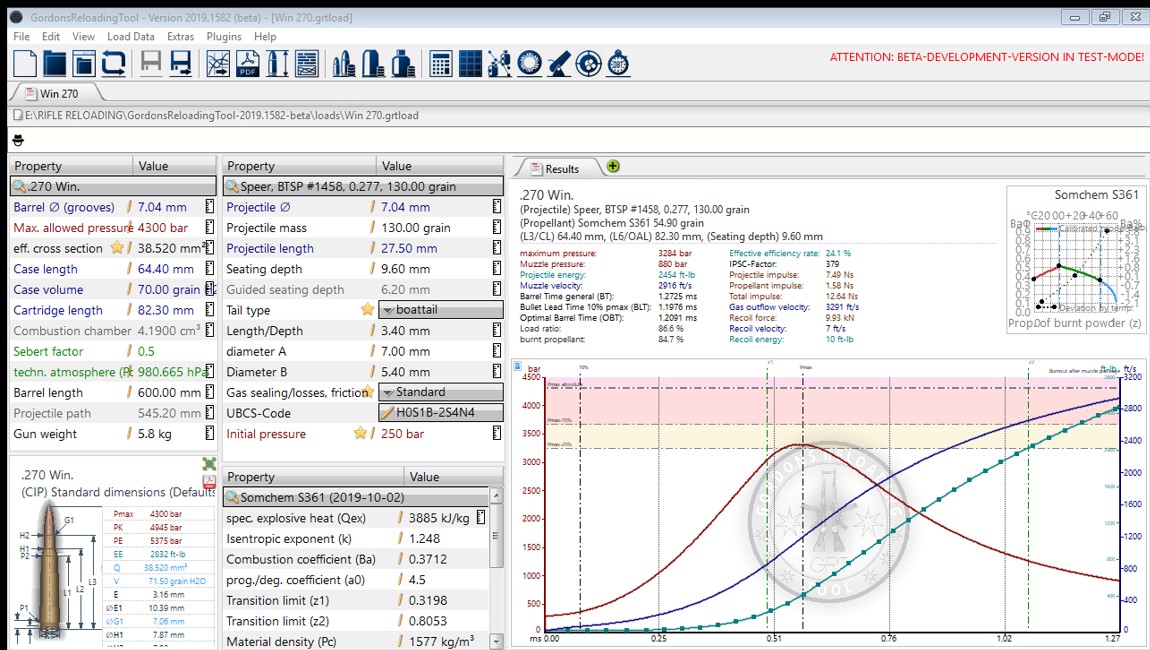
Screenshot Gordons Reloading Tool
GRT Screenshot
QL
QL Screenshot

Where to find the Ballistics Software.

QuickLoad can be purchased at quickload.co.uk . It is only available on CD and can not be downloaded online.

Gordons Reloading Tool can be downloaded from grtools.de. Just register , its free and you will have access to the Beta download.

Both these are for Win based systems.

Support documentation and Materials.

QuickLoad comes with User documentation on the CD.

GRT  allow you to access a manual under the Help Menu but a lot of help is also integrated in the application itself. A YouTube channel can also be subscribed to. The channel has helpful Videos both in English and German for the beginner.

My personal experience. 

I have used both these applications each have their plus points. The GRT is used most of the time purely because it’s database of propellant and bullets fits better with what I actually use. The algorithms used by QL and GRT are not the same so no direct comparison can be made of results between the two.

Suffice to say the results from both are fairly close to my experience on the shooting range +_ 20% on Velocity.

GRT has the (Optimum Barrel Time) OBT tool that I like and it can be used to suggest charge loads to the different Nodes. More on OBT can be found Here. The Screen display with GRT is also selectable under the Menu VIEW- APPEARANCE- PRESET, this allow you to customize the view to your preference.

In the future if time permits I will post a blog on how I use the GRT software when developing loads.
Support the GRT Team.

For now I would Like to ask all the Reload Today readers to support the GRT Team, they are doing a great service to the world wide reloading community in developing a excellent application.

If you download the GRT tool and use it, please look at the following video. Download the templates and send them back to the GRT Team with your measured data. It is a impossible task for them to collect the data for all loads out there on their own. Just a small way in which the reloading community can say Thank You to the GRT Team.

Close Menu